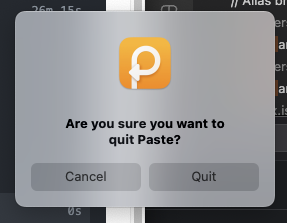
Please fix/remove the "are you sure you want to quit" popup
ShippedEver since beginning to use Paste, none of my computer updates will automatically update...because each update is blocked because Paste opens a "are you sure you want to quit" window instead of letting it be automatically closed. There's a reason every Mac app doesn't do this. Please fix/remove this, as it's annoying and unnecessary - and not a mac app standard. Or, at least make it a setting, so we can control it. Otherwise, Paste has been working very well; and I'm hoping I'll be able to continue to use it if the above issue is resolved.
Comments (10)
- PW
Paul Watson · Aug 29, 2023
Agreed. I'm a happy paying Paste user but for the last while every morning I open my computer and Paste has a dialog saying "Are you sure you want to quit Paste?" This is blocking automatic nightly updates and other processes I run. There is no option in settings to turn off this feature like Chrome has.
- PW
Paul Watson · Aug 29, 2023
I'd actually consider this a bug not a feature request.

Paste Team · Aug 30, 2023
Released in 4.0.8
- CR
Cornelius Roemer · Sep 3, 2023
Excellent, thanks!
- K
Kirsten · Nov 16, 2023
I'm having the same issue - Paste keeps asking if I want to quit it, which I do not. I don't understand the Paste Team responses. What do I do to fix this?
- PW
Paul Watson · Nov 16, 2023
Make sure you are on version 4.0.8 or later Kirsten. It has stopped doing it for me since that version.
- K
Kirsten · Nov 16, 2023
Sorry but how do I get on the right version (mine is indeed out of date). I don't see a way on the P on my dashboard, nor how to update on the pasteapp.io website.
- PW
Paul Watson · Nov 16, 2023
I installed mine via the Apple App Store so you might need to update it via that https://apps.apple.com/za/app/paste-clipboard-manager/id967805235
- K
Kirsten · Nov 16, 2023
I did update the version on my Iphone, then quit paste on my laptop and restarted, hoping that would do the trick but no luck.
- N
Nadya · Nov 17, 2023
Please make sure you have the latest version on your Mac as wll, you can update via AppStore as any other app. If you experience any problems please send us a message at http://pasteapp.io/contact, we would love to help!