MCP
MCP
Turn clipboard history into context for AI tools
Paste MCP connects your clipboard history to Claude,
Codex and other AI tools
Keep, search, organize, and collaborate on everything your team copies across all devices.
Use Paste as memory
for your AI workflow
Ask your AI tool to turn notes, links, files, and other items saved
in Paste into something useful
Use Paste as memory
for your AI workflow
Ask your AI tool to turn notes, links, files, and other items saved in Paste into something useful
Draft updates from copied notes
Find the notes I copied today in Paste. Draft a team update for the launch using them.
Start from saved research
Find all items related to this research that I copied in Paste this week. Suggest a structure for my presentation.
Reflect on your workflow
Check Paste for what I copied today. Give me a brief recap of my work.
Organize projects in pinboards
Find all items relevant to this project in Paste. Create a pinboard and add them there.
Use Paste as memory
for your AI workflow
Ask your AI tool to turn notes, links, files, and other items saved
in Paste into something useful
Draft updates from copied notes
Find the notes I copied today in Paste. Draft a team update for the launch using them.
Start from saved research
Find all items related to this research that I copied in Paste this week. Suggest a structure for my presentation.
Reflect on your workflow
Check Paste for what I copied today. Give me a brief recap of my work.
Organize projects in pinboards
Find all items relevant to this project in Paste. Create a pinboard and add them there.
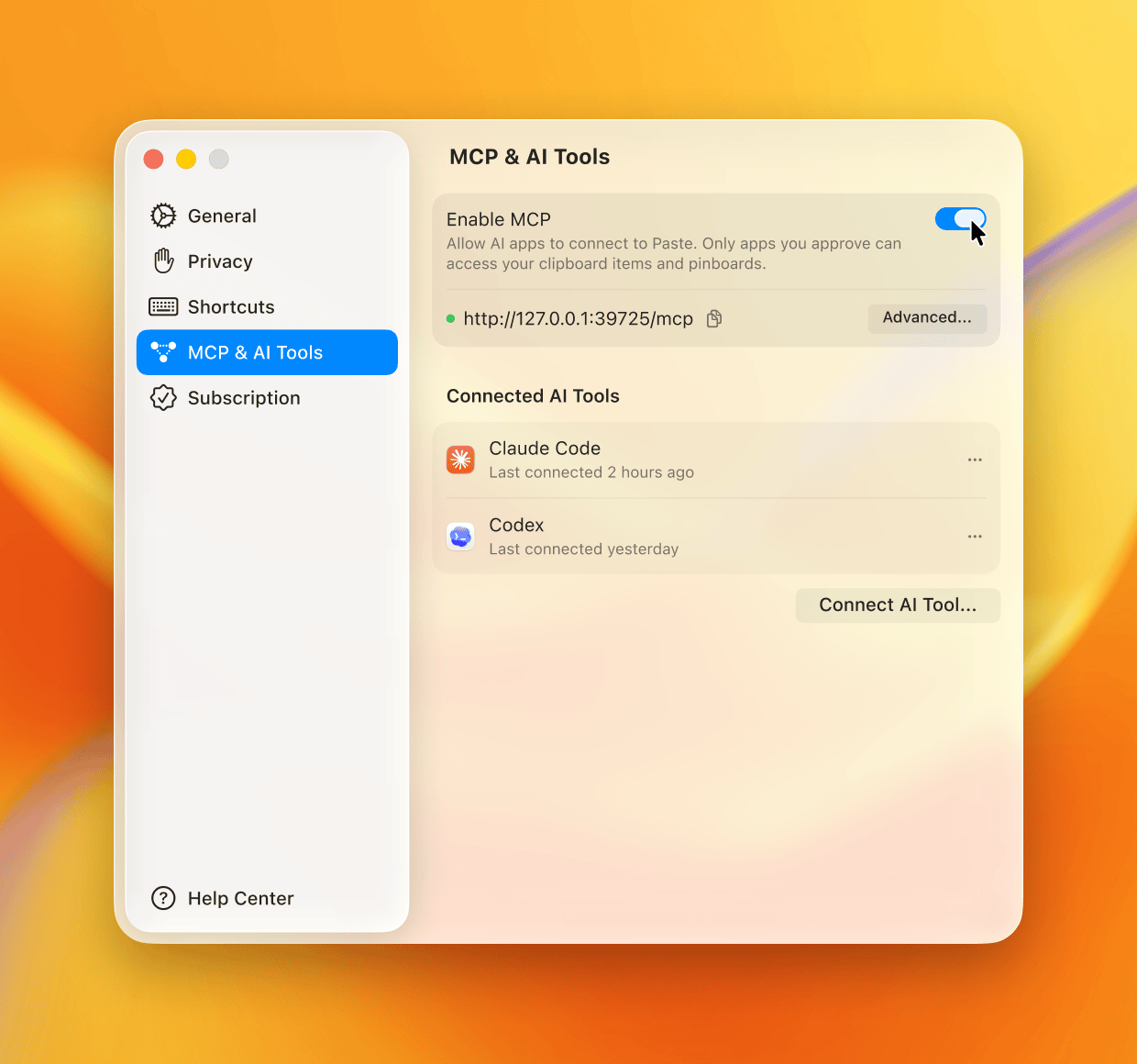
Set up Paste MCP
Works with Claude, Codex, Cursor, and other tools that support MCP
Set up Paste MCP
Works with Claude, Codex, Cursor, and other tools that support MCP
1
Open MCP settings in Paste
2
Enable MCP
3
Choose your AI tool
4
Follow the setup guide


Set up Paste MCP
Works with Claude, Codex, Cursor, and other tools that support MCP
1
Open MCP settings in Paste
2
Enable MCP
3
Choose your AI tool
4
Follow the setup guide

You stay in control
Paste MCP runs locally on your Mac.
You decide which tools to connect and can remove access at any time.
Your clipboard history stays under your control.
You stay in control
Paste MCP runs locally on your Mac.
You decide which tools to connect and can remove access at any time. Your clipboard history stays under your control.
You stay in control
Paste MCP runs locally on your Mac.
You decide which tools to connect and can remove access at any time.
Your clipboard history stays under your control.
Frequently
Asked Questions
Frequently
Asked Questions
What is Paste MCP?
Which AI tools work with Paste MCP?
What can I ask my AI tool to do with Paste?
Do I need Paste installed to use Paste MCP?
How does Paste MCP handle clipboard history?
Can I choose what my AI tool can access?
Does Paste MCP work on iPhone or iPad?
Frequently
Asked Questions
What is Paste MCP?
Which AI tools work with Paste MCP?
What can I ask my AI tool to do with Paste?
Do I need Paste installed to use Paste MCP?
How does Paste MCP handle clipboard history?
Can I choose what my AI tool can access?
Does Paste MCP work on iPhone or iPad?

Bring Paste into your
AI workflow
Use clipboard history as context without leaving the tool you are in
Use clipboard history as context without leaving
the tool you are in

Bring Paste into your
AI workflow
Use clipboard history as context without leaving the tool you are in
© 2026 Paste Team ApS. All rights reserved.
All trademarks are the property of their respective owners.
© 2026 Paste Team ApS. All rights reserved.
All trademarks are the property of their respective owners.
© 2026 Paste Team ApS. All rights reserved.
All trademarks are the property of their respective owners.